
In my professional and personal experience, I have come to the conclusion that hardly anyone keeps owner’s manuals around. Don’t worry, this isn’t a dig at you but for some reason no one ever thinks he/she will need it again. Why? I am not certain. It is safe to say that somewhere down the line, the product will fail. And once it fails, the owner’s manual should be one of your first go-to documents for resources.
Sometimes, it’s not about the initial need for the manual, but for issues that spring up down the line. Pool owners are a group of consumers who I think need to keep all their manuals around, especially if you own any type of automation or salt chlorine system. The cool thing about salt systems is that when an error occurs, it typically gives you an error warning or code. That code gives customers a better idea of what the problem is and how to address the issue. But where are those codes and explanations usually? Take a wild guess.
The owner’s manual.
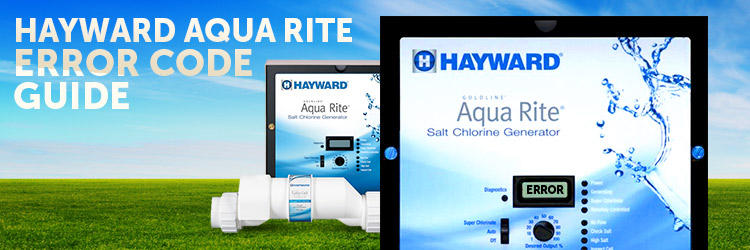
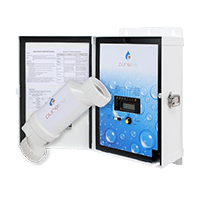
Hayward’s AquaRite Salt Chlorine Generator is one of the most popular lines on the market today. It is one of the easiest ways for you to sanitize your pool. Although I won’t get into too many details on how great the product is, you can read our customer reviews to get unfiltered opinions about it.
Still, one thing I do commend Hayward for is their simplistic error code guide. Compared to a lot of others on the market, going through their manual and troubleshooting guide was as customer friendly as you are going to get. But what good is a manual if customers don’t keep it?
Hayward Aqua Rite
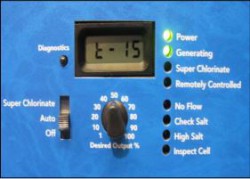 The Hayward AquaRite system was strategic in the design in the sense that there aren’t too many variations of error codes programmed into their system. Unlike the Jandy AquaPure unit, which displays a number that then corresponds to a particular error, the Hayward Aqua Rite is simplistic in nature. It tells you the source of the issue.
If you take a look at the picture on the left, there are only 4 different error functions: No Flow, Check Salt, High Salt, and Inspect Cell. Although there may be several reasons for the error code to appear, having only 4 possibilities is great odds for a pool owner. It also makes it very clear to the pool owner what the issue might be once they venture out to the system. Let’s explore the different Hayward Aqua Rite error codes, what they mean, and how you can get rid of them.
Check Salt & Inspect Cell
Seeing as this is a salt chlorine generator, one of the most frequent error codes you will see will have to do with your salt 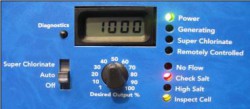 levels or the cell where the salt is produced. And because one directly affects the other, both lights will appear when there is an error concerning the salt levels. Let’s dig a little deeper.
I. ‘Check Salt’ Light & ‘Inspect Cell’ Light Flash Together
When both these lights flash together, it means your salt level is between 2500 ppm and2600 ppm. At this moment chlorine is still being produced, however your salt levels are dwindling. Keep in mind, your ideal salt level should read 3200 ppm. Your AquaRite system may be working efficiently and your pool may be clear at the moment, but in a week or so, it may not be the case anymore.
Remedies:
- Independently verify the salt levels in your swimming pool. You can utilize one of our at home testing kits, or you can get your water tested at your local pool store.
- Once your water has been tested, add salt to your pool to bring your levels back to the recommended 3200 ppm. You can review how to add salt on our site, as well.
- Inspect and clean cell if, necessary.
II. ‘Check Salt’ Light & ‘Insect Cell’ Light Stays On
If both the Check Salt and the Inspect Cell light stays on that means no chlorine is being produced at this time. That is a big “uh-oh” for any pool owner. It also means your salt level fell below 2300 ppm. Yikes! Both lights will also stay on if the control is set to the wrong turbo cell type, or if the cell is unplugged.
Remedies:
- Independently verify the salt levels in your swimming pool. You can utilize one of our at home testing kits, or you can get your water tested at your local pool store.
- Once your water has been tested, add salt to your pool to bring your levels back to the recommended 3200 ppm. You can review how to add salt on our site. If your independent testing shows your salt levels are correct, but your system is showing something different, you may need to recalibrate your Aqua Rite unit.
- Inspect and clean cell, if necessary.
- Verify if the control is set to the correct turbo cell.
III. Only ‘Inspect Cell’ Light Flashes
If the ‘Inspect Cell’ light flashes by itself, it is an early indication that the cell life is coming to an end. Each cell is equipped with 500 operational hours and requires a manual reset once it expires.
Remedies
- To reset the cell, hold down the ‘Diagnostic’ button for 3-5 seconds.
High Salt
The ‘High Salt’ light is exactly what it says There is literally a higher recommended amount of salt in your pool. Your unit will detect and alert this to the owner.
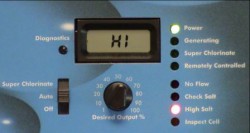 I. ‘High Salt’ Light Stays On
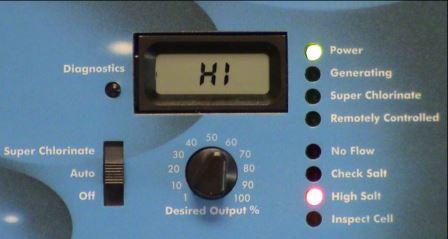
The ‘High Salt’ light will stay on for several reasons including: cell amperage is above the maximum limit, the control is set to the wrong turbo cell, or you simply have too much salt in your pool. The LCD display will read “HI”.
Remedies
- Independently verify the salt levels in your swimming pool. You can utilize one of our at home testing kits, or you can get your water tested at your local pool store.
- Once your water has been tested and the reading is too high, reduce the levels of salt in your pool to bring your levels back to the recommended 3200 ppm.
- Verify if the control is set to the correct turbo cell.
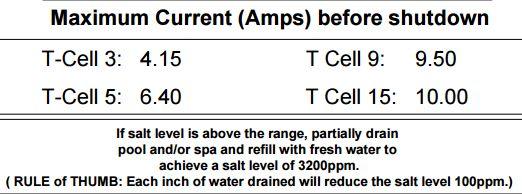
- Verify cell amperage to ensure it is not above the maximum limit for your model. Check below for the maximum current amps before the unit shuts down.
No Flow
The ‘No Flow’ light is an indication that there is something funny going on with the flow in your piping or the flow switch itself. If there is an issue with the flow, the ‘No Flow’ light will flash up to 60 seconds at start up. If none of the below remedies solves your issue, you may need to replace your flow switch.
Remedies
- If a LED is flashing, wait 60 seconds after starting the filter pump. Check for possible disruption inside of the flow T.
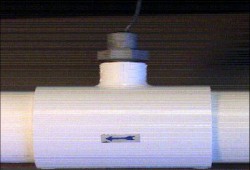 Installation requires 12 inches of straight pipe before the flow switch. There should be no elbow after the flow switch.
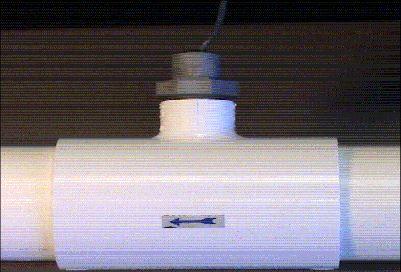
 - If a LED is ON, check to see if the flow switch was installed correctly. The arrows at the top of the hex nut should point in the direction of the water flow. (Your flow switch requires a minimum flow rate of 11 GPMs to stay consistently closed.
- Check the flow switch for damaged or cut wires.
Low/High Cell Temperature
Although there isn’t an error setting for temperature on the control, the LCD monitor will let you know if your water is either too hot or too cold for standard operation. The cell’s operating temperature range for the cell is 50F to 140F. The output is scaled back to 20% at 60F and output completely stops at 50F.
The LCD display will read COLD when the water temperature is below 50F.
The LCD display will read HOT when the water temperature is above 140F.
No manual is more efficient than the technical support provided by the manufacturer. The manual allows you to get familiar with your system and put your DIY skills to the test. If at any point you do not feel comfortable or simply just don’t know what to do, definitely give us a call. If it’s something that we can’t solve, we will put you in contact with a rep from Hayward.
Feel free to check out our how- to guide section for many more how-to guides dealing with the Hayward Aqua Rite system.






Leave a Reply