Home / Articles / Troubleshooting Your Hayward Aqua Rite System

Troubleshooting Your Hayward Aqua Rite System

Salt chlorine generators are great products. But, you know what’s not great? Troubleshooting and diagnosing their problems. If you’re reading this blog that means you need help troubleshooting your Hayward Aqua Rite salt system. Well, the good news is you are at the right spot and you’re definitely not alone.

This blog is an in-depth look at the Aqua Rite and Aqua Rite XL diagnostics manual created by Hayward.

Check Salt & Inspect Cell LED FLASHING or ON

The Inspect Cell LED (only) flashes or stays on when:

  • The 500 operation hour countdown timer expires. To fix the problem, manually reset the Inspect Cell LED.

How To Reset The Inspect Cell LED

  1. Press and hold the diagnostic button for 3 to 5 seconds. The LED light should go out.

The Check Salt & Inspect Cell LED’s flash together when:

  • Your salt level is between 2500-2600 parts per million (ppm). Your chlorine generator is still producing chlorine at the moment, which is a good thing. This is more of an indicator light than anything else.

The Check Salt & Inspect Cell LED’s will stay ON when:

  • The salt level is 2300 ppm or less and no chlorine is generating.

Possible Remedies

Step 1: Check your system to confirm that you have programmed the correct salt cell size. If you program the incorrect cell size, the salt level, amperage, and voltage will not be correct and the system will turn off. Also, make sure you plug in the cell all the way. You might be surprised by how many people neglect to check this area.

How To Set Your Turbo Cell Size

  1. Slide your main switch to the AUTO position.
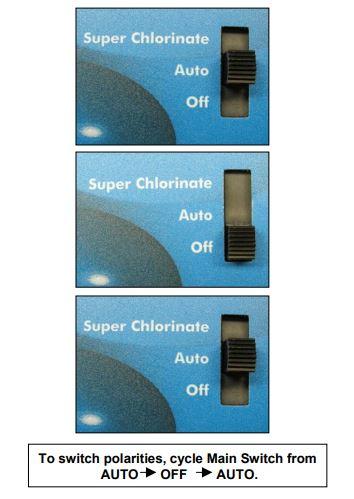
  2. Switch your cell type by cycling the main switch from AUTO to SUPER CHLORINATE and then back to AUTO.
  3. Push the diagnostic button until “T-XX” appears on the display.

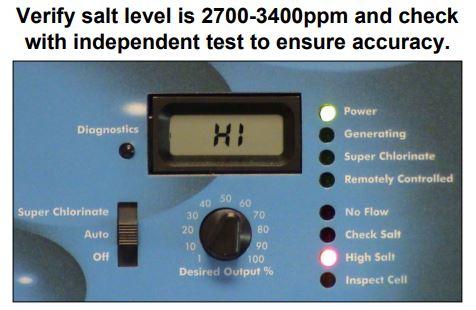
Step 2: Verify the accuracy of the salt readings (2700-3400 ppm) with an independent test kit or by taking a water sample to your local pool store for testing. 3200 ppm is the ideal level.

If the salt level is below range, add enough salt to achieve a salt level of 3200 ppm.

If the salt level is within range, go to Step 3.

How To Add Salt To Your Pool

Step 3: Is your cell clean? Inspect and clean your cell. If you haven’t inspected your cell yet, now is a perfect time. (Yes, literally now.)

Does your cell look like 4A or 4B?
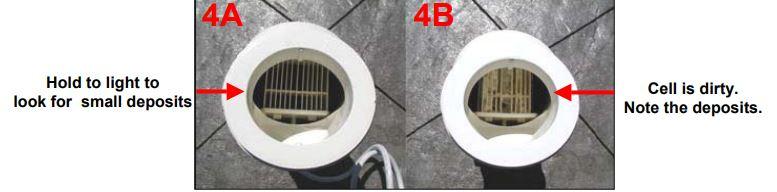
If your cell looks like 4A, continue to Step 4.

If your cell looks like 4B, follow the instructions below for cleaning your cell.

How To Clean An Aqua Rite Turbo Cell 

Step 4: Reset the average salt level.

Reset the average salt level on startup and whenever you replace your cell. (The factory default is 2800 ppm)

How To Recalibrate The Average Salt Level

  1. To reset your average salt level, turn the unit to OFF and then back to AUTO. Wait for the relay to click (5 to 10 seconds).
  2. After the click, immediately push the diagnostic button 5 times to begin the recalibration stage.
  3. Once it finishes calibrating, cycle the Main Switch from AUTO to SUPER CHLORINATE and back to AUTO.

Step 5: Measure your cell’s polarity to ensure they meet system parameters.

If the amps on either reading show zero (0), then you should replace your Main PC Board (GLX-PCB-RITE).

If the amps show a reading that isn’t within range, then you should replace your Turbo Cell.


click here to find your replacement Salt System Parts

High Salt LED ON

The High Salt LED stays on when:

  • The cell amperage is above the maximum limit.
  • You have too much salt in your pool.
  • The control is set for the wrong turbo cell type.

Possible Remedies

Step 1: Check your system to confirm that you have programmed the correct cell size. If you program an incorrect cell size, the salt level, amperage, and voltage will not be correct and the system will turn off. Also, make sure you plug in the cell all the way. You might be surprised by how many people neglect to check this area.

How To Set Your Turbo Cell Size

  1. Slide your main switch to the AUTO position.
  2. Switch your cell type by cycling the main switch from AUTO to SUPER CHLORINATE then back to AUTO.
  3. Push the diagnostic button until “T-XX” appears on the display.

Step 2: Verify the accuracy of the salt readings (2700-3400 pm) with an independent test kit or by taking a water sample to your local pool store for testing. 3200 ppm is the ideal level.

If the salt level is below range, add enough salt to achieve a salt level of 3200 ppm.

If the salt level is within range, go to Step 3.

How To Lower Your Salt Levels

Step 3: Is your cell clean? Inspect and clean your cell. If you haven’t inspected your cell yet, now is a perfect time. (Yes, literally now.)

Does your cell look like 4A or 4B?

If your cell looks like 4A, continue to Step 4.

If your cell looks like 4B, follow the instructions below for cleaning your cell.

How To Clean An Aqua Rite Turbo Cell 

Step 4: Reset the average salt level.

Reset the average salt level on startup and whenever you replace your cell. (The factory default is 2800 ppm)

How To Recalibrate The Average Salt Level

  1. To reset your average salt level, turn the unit to OFF and then back to AUTO. Wait for the relay to click (5 to 10 seconds).
  2. After the click, immediately push the diagnostic button 5 times to begin the recalibration stage.
  3. Once it finishes calibrating, cycle the main switch from AUTO to SUPER CHLORINATE and back to AUTO.

If recalibrating your salt level did not resolve your problem, then your cell or your PCBoard is bad and needs replacing. For more in depth troubleshooting or if you need help discerning which one to replace first, we recommend calling Hayward directly.

No Flow LED Flashing or ON

The No Flow LED flashes for up to 60 seconds during startup.

  • If the No Flow LED is flashing, wait 60 seconds after starting your pump and filter.
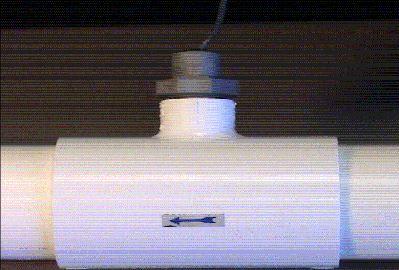
  • Check for possible turbulence or obstructions inside of the flow T.
  • Ensure there are at least 12 inches of straight pipe before the flow switch.
  • There should be NO elbow after the flow switch.

Possible Remedies

Step 1: Wait 60 seconds after the pump starts. Typically, the LED light should shut off after 60 seconds. If it does not, keep reading.

Step 2: Verify that you have enough straight pipe before where you have installed your flow switch. There should be at least 12″ of straight pipe before the switch.

Replumb your flow switch if it does not meet the distance requirements. Does the LED light turn off after 60 seconds? If not, keep reading.

Step 3: Ensure that there isn’t anything obstructing or blocking the flow. In most cases, if there is a blockage, your pump’s pressure increases. Remove blockage and backwash your filter.

Step 4: If none of the previous steps solved the problem, replace your flow switch.

The NO FLOW LED stays ON when there is a flow switch problem.

  • Verify if your flow switch was installed correctly.
  • The arrow at the top of the hex nut points in the direction of the water flow.
  • Flow switches require a minimum flow fate of 11 gallons per minute to stay consistently closed
  • Check for damaged or cut wires

Possible Remedies

Step 1: With your pump running, double-check the positions of your valves.

Step 2: Did you properly install your switch? The arrow should point in the same direction as the water flow. If it is not, re-align your flow switch.

Step 3: Double check the wires on the flow switch for damage. If you see any damage, replace your flow switch. If there isn’t any apparent damage, keep reading.

Step 4: Verify your pump’s pressure. If you see an increase in pump pressure, ensure that there is no blockage preventing the flow.

Step 5: Replace your switch.

Low or High Cell Temperature
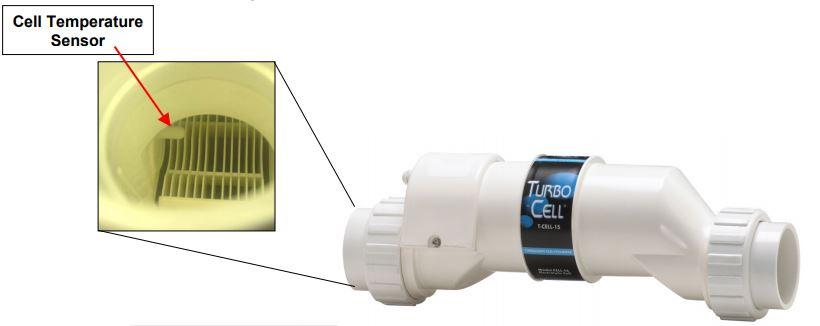
The LCD display reads COLD when:

  • Water temperature is below 50 degrees F. (The cell output scales back to 20% once it reaches 60 degrees F and shuts off at 50 degrees F.)

The LCD display reads HOT when:

  • Water temperature is above 140 degrees F.

* If your water temperature reads 215 degrees F, the cell temperature sensor is shorted and your cell needs replacing. *

Other Common Problems and Solutions

Power LED Not On

  • Make sure that either 120VAC or 240VAC input power is connected to the proper screw terminals at the Aqua Rite control.
  • Verify input voltage with a voltmeter
  • If there is input power, the fuse may have blown.
  • The Aqua Rite is protected by a 20 amp mini ATO fuse located on the circuit board above the cell connector.

‘Generating’ LED Flashing

  • The temperature of the pool water is too high or too low to operate.
  • Override this by moving the Main Switch to Super Chlorinate. The Aqua Rite runs at maximum out for for the remainder of the current pump cycle or for 24 hours, whichever comes first.

author avatar
Charlie Ramirez
Writer at InyoPools.com, brings a wealth of knowledge and expertise in pool care and equipment, helping pool owners make informed decisions for over a decade.

Related Videos

332 responses to “Troubleshooting Your Hayward Aqua Rite System”

  1. Chad Avatar

    My qua Rite is reading very low salt, 300 ppm. I had it checked and it is low, but at 1500ppm. I tired to calibrate several times, but I never get the countdown. When I follow the steps it just shows 000 on the screen. It never actually starts at a higher number then starts a countdown. What do I do now?

    1. Matthew Simmons Avatar

      Since your salt is too low, first, I would address that. Get out your owner’s manual, pull up the salt chart. Add the right amount of salt. No use in fiddling with the cell when you don’t have enough salt in the water for it to operate properly.

      aquarite salt chart

    2. Wayne Avatar

      The message screen is saying “no power to cell inspect system”. I’ve checked everything I know how to check to no avail. Any suggestions. Wcives44@aol.com

      1. Matthew Simmons Avatar

        What is the make and model of your salt system? Because the AquaRite does not have that error message.

  2.  Avatar

    when i opened my pool this year the console would light up but does not show any words such as salt level and so on. what would cause that?

    1. Matthew Simmons Avatar

      That sounds like a bad AquaRite display board. We carry two options as replacements: Aqua Rite Replacement Display PCB Board (GLX-PCB-DSP) OEM version or Aftermarket version.

      How to Replace an Aqua Rite Display PCB

  3. Brent Avatar

    Hi Matt,

    When my cell is plugged into the control panel, the power light, generating light and super chlorinator light shut off after about 5 seconds. When I unplug the salt cell plug from the control panel, all lights stay illuminated. Thoughts other than my cell is bad? Can I fix it or if it’s dirty would it shut off???

    Thanks

    1. James Avatar

      This is exactly what I am seeing. After working for years, suddenly I am having haze issues this year. If I flip the breaker to the system and then reset it, it works perfectly – it flashes no flow for the usual time (30 seconds?) then decides all is good and tells me it is generating… for about 5-10 seconds. Then the generating LED shuts off, and it won’t register no flow or anything else unless I reset the breaker again.

      Cell is clean, flow is good.

      1. Matthew Simmons Avatar

        It may be a board issue but anything I say would be a guess. I suggest you contact Hayward to see if they can point you in a solid direction. Hayward tech support can be reached at 908-355-7995

        1. Jeff Avatar

          Hi. I just replaced both the board and display board on my system and the lights on the right side do not stay lit, It starts as no flow. Then went to generations then goes blank, the display reads all functions, the salt cell was replaced last. Season.

          1. Matthew Simmons Avatar

            What boards did you use to replace the originals? Were they OEM replacement board or Pureline aftermarket?

          2. Jeff Avatar

            Replaced with original Hayward parts

      2. Andy Gallagher Avatar

        Did you ever solve this issue or determine the cause. I’m having the exact same issue.

      3. Ryan Avatar

        Any resolution here? Having the same issue.

  4. Tracy Avatar

    My board is telling me check salt, check cell. I have cleaned my cell well put it back on and reset my board. It said power, generating, chlorinating and then about 3 min later, check cell, check salt light came back on. Could this mean that my cell is bad? I have been looking for a cell replacement. I have Hayward T-cell -5 now and I am not finding that same cell? is there any cell compatible with my cell?

    1. Matthew Simmons Avatar

      But did you actually check the salt levels of your water? if your salt levels are low the cell can’t operate. At least rule this possibility out by checking the water chemistry at the local pool store with a free test.

      We carry the TCELL5

      1. Renee Avatar

        Matt,
        We are having the same issue. Check salt and inspect cell light staying on. Just replaced t-15 cell, same issue again.Salt level has come up to 2200. Can we shock the pool with chorline to help? This is the first issue we have had in 6 years 😬

        1. Matthew Simmons Avatar

          The Aquarite manual and the troubleshooting guide is clear when it says the unit needs 3200 ppm to operate optimally.

          Unless I am missing something, it sounds like both of you need to add salt.

        2. Josh W Avatar

          Hey guys! For those of you having issues after you replace the cell with low salt readings, check cell etc.

          I had the same issue and couldn’t find a solution but it seems to be as simple as setting the cell type on the unit.

          It was showing that I had T-3 cell when in fact I have a T-15. Once I changed the type on the panel, boom, working well.

          Somehow the panel reset the type and I missed it and thought it was automatic. Almost called the company to yell at them for sending the wrong cell.

          Hope this helps some of you.

          1. Matthew Simmons Avatar

            And for instructions on how to reset the cell, Step 9 on this guide: How to Read and Adjust the Hayward Aqua Rite SCG Operational Values
            Thanks, Josh.

            the real mvp

          2.  Avatar

            How do you reset that?

  5. John Farlowe Avatar

    My salt reading is reading very low 1,2 but sure there is salt reset the unit now reads 000 any ideas change the cell ??

    1. Matthew Simmons Avatar

      Can you clarify your question? I am having trouble understanding it.

      1. Haiduo Avatar

        Hi Mat,
        If the salt level by kit test is 3200 and I did not Recalibrate The Average Salt Level, what will happen? I mean, will the system work? What is the purpose of the Recalibrate The Average Salt Level?

        1. Matthew Simmons Avatar

          If you turn on your AquaRite system, are there any alerts, alarms? Also, is it producing chlorine normally?

          if the system is working, I would just let it work until there is an actual cause for concern, i.e. low chlorine levels, water turning green, control unit alerts.

          1. Haiduo Avatar

            Thanks. Everything is OK except that the salt level shown is different from salt test. Then I just let it go until there is an actual cause for concern.

  6. Clinton Bradley Avatar

    My average salt reading is 2700 but the instant is -5300! What does that mean?

    1. Matthew Simmons Avatar

      This is the explanation of Instant salt:

      INSTANT SALT LEVEL – The salt level that the System is calculating during the chlorination cycle. A “-” symbol is place in front of the number to distinguish it from the Average Salt Level. Measured in ppm or grams/Liter depending on units of measure setting.

      Did you just pour in new salt?

    2. Bob Avatar

      How old is your salt cell? 3-5 years is a typical age. Actually, if you get 5 years out of one, you are doing pretty good. Old, worn out salt cells will indicate erroneous high salt levels. The only way to know for sure is to test the water. TIP: Your local pool supply store will test the water for free but IMO, too often they get it wrong. Invest in a good test kit (i.e. Taylor) and do it yourself, it is very easy and will pay for itself over time. The best way to know if your system is generating chlorine is to check the voltage and current displays on the controller box front panel. Per a Hayward technician I talked to, around 25-27 volts and 4-7 amps is typical when the system is generating chlorine. Keep in mind that with the % dial set at anything less than 100%, they system will turn on and off. When it is off, and not generating chlorine, the voltage will be around 31-32 volts and the current will be zero. When you first turn on your pump and the system is up and running is the best time to check the voltage and current levels. He also told me that it is a good idea to write down the numbers when the salt cell is brand new. When the salt cell gets old and worn out the numbers (especially current will change. The current typically goes down when the cell gets old. It is a good idea to learn how to use and read the front panel display and LED’s. It tells a lot about the health of the system.

  7. Mike Avatar

    Hi ,
    I just opened my pool and added salt according to the pool tech advice. I will test the water in a few days to see if I need to add more salt. My salt level is low (2000) and the check cell and salt level light is on which I’m assuming is normal because the salt is low. My question is, should the generating light be on? because its off. wondering if its off because the salt level is low or is there something wrong with my cell. Is the generating light always suppose to be on?

    1. Matthew Simmons Avatar

      The generator can’t efficiently create chlorine with low salt, so the control panel does not turn the cell on. If the cell isn’t on, then the generating light will not be lit.

      The short of it is, add salt.

  8. Rik Thomas Avatar

    The voltage indicator says it is 32.3 volts in the manual says it will not produce if over 30 volts what causes the high voltage and how do I repair it

    1. Rob McLintock Avatar

      Hello Rik – Unless the AquaRite is set to run at 100%, it would be normal to occasionally see a 32.3 voltage rating. For example, the Aquarite will only generate chlorine half the time the pump is running when the salt system is set on 50%. It would give you a 32.3 reading if you checked it at a time when it was not creating chlorine. Is the Aquarite still producing chlorine?

      1. Christina Avatar

        Hi there. One of my customers has a new salt system put in a a couple months back by their previous pool serivce. He never put salt in. So when she hired me I put the required amount of bags I
        Of salt in her pool. The following week the reading was at 3600. CYA, PH, Alk were spot on. Then one week
        Later (today) the pool was green!!! A swamp! And when I tested it with my Taylor test kit and salt meter is showed no chlorine no salt but the salt is reading 3800 on the display. Checked amps and to make sure it was programmed to the correct cell. All seems good. It’s Brand new Hayward system. Help????

        1. Christina Avatar

          Jeez. Sorry for all the typos. Guess I should have proof read this.

        2. Tried and True Avatar

          Make sure the Cel model is properly set in panel. T-5, T-15, etc
          If the sand filter is filthy, there is not enough salt to clean.
          Do a back flush then a super chlorination. Leave it alone
          It will stop at 24 hrs.

        3. Bob Avatar

          Your salt level at 3800 is too high. The system will stop producing chlorine when salt levels are above 3400. The Hi Salt LED should be on when the system is running telling you the salt level is too high. You need to drain the pool some and then add water to lower the salt level.

  9. JWF Avatar

    this is really really helpful. my local rep never told me about some of these calibration procedures. i asked him “there must be a calibration that needs to happen every once in a while with these cells” and he said no not really. ugh. =(

  10. Ken Avatar

    None of my LED’s are lit, but I can read the diagnostic screen when I push the button. Just had water tested at my local pool store and FAC and TAC are at 4ppm and salt is 3500ppm.

    1. Matthew Simmons Avatar

      I’m not sure if I am following your question in there.

      But even the Power LED is not coming on? If your cell is creating chlorine, it seems like a display board issue.

      1. Art Avatar

        Matthew – I am having the same issue as above. Turn the pool on, the flow indicator blinks for 2 minutes or so, then goes out like normal. The Generating light comes on and remains on for 15 – 30 seconds, then goes off. No indicator lights remain on, but I can go through all screens on the diagnostics LCD so I believe there is power. I did open it up and checked the fuse and it looked fine, no indication of it being blown. Any thoughts on how to remedy?

        1. Matthew Simmons Avatar

          I would revert to my previous answer. Is chlorine still being produced? If so, it is a problem you can live with. If the cell isn’t working then you need to try cleaning/troubleshooting the cell to determine if the issue is there or lies in the control board.

          1. Chris Avatar

            I’m having this exact problem. Yes there is chlorine in the pool. The one thing I’ll add it that my power and generating light both come on for about 15 seconds while it appears the system is checking for the current salt level. At the completion of the check, which is about 15 seconds, it shows “-0” and then it clicks, and all lights turn off. This process happens every 1-3 minutes, continuously.

          2. Matthew Simmons Avatar

            What is your AquaRite’s amp and volt reading? As the guide above says, it is an important thing to know for diagnosing.

        2. jay cory Avatar

          current limiter out

        3. jay cory Avatar

          that round black disk is current limiter squese flat sides see if power light comes on if yes current limiterbad

          1. Jacob Gregory Avatar

            Hey Jay this seems to be the issue on my system when i squeezed the sides they lights came on for 15-20 secs before going out again. Do you know if you can replace just the limiter?

          2. Matthew Simmons Avatar

            Yes, the current limiter can be replaced. You can find the Current Limiter, #570-1062-ND from Digikey.

          3. Bret Bobeck Avatar

            The round disk piece separated on mine. I was able to spray CRC QD Electric Cleaner between the two pieces and press the two pieces back together. Everything lights up now. Wow, that was cheap!

          4. Matthew Simmons Avatar

            Are you referring to the current limiter? If so, that part is a few dollars at most hardware stores; I would rather buy a new current limiter than risk gluing one back together.

        4. Den Avatar

          Its a heat sync issue you can buy them yourself and if you know how to solder replace it yourself for under 50 cents unless you want to pay around $300 for aq pool guy to come out and replace your card and then make his money. Your choice.

        5. Kurt Avatar

          Same here. What did you do?

        6. Todd Avatar

          Anyone find a solution for this? I have the exact same problem as Art.

          1. Sue Avatar

            We replaced the thermister. 6 dollar part. Works perfectly now.

          2. Bert Avatar

            I had the same issue and after reading this blog, I bought a 2 pack of the current limiter part # 570-1062NG and soldered on in place of the bad one, took 15m to complete, problem solved, everything work perfect.

            Thanks.

        7. Ryan Avatar

          Most likely your current limiter. I had the same problem, and this fixed it immediately. Symptoms were the same. It cost like $2.50 for a new one. I pulled mine out and it fell apart in my hands. Resoldered it, and works like a champ now. Soooo much better than being told you need a new control board for $350+. Even if you spend the $2.50 to try it you always have the fallback option, and only lost a few dollars. I am 90% sure this is the issue though.

      2. Tanya Nichols Avatar

        My display is reading pcb, can’t reset board. Cant find this issue . can’t reset display, check salt level, check cell, which is new. I need to knkw whats the probable issur?

        1. Matthew Simmons Avatar

          The PCB is the issue. You need to replace the main PCB which is the GLX-PCB-RITE for the AquaRite

    2.  Avatar

      Did u ever find a solution? I’m having g the same problem.

    3. Dave Avatar

      same problem here Ken did you find out whats happening with it

    4. Jeff Avatar

      Sounds like a bad controller board….

      1. Chris Avatar

        Same problem!

        Any fix for that issue?

      2. Jeff Avatar

        Replaced both the main board twice and the display board, lights go on for 30 seconds then all goes out except for he display, pool now not generating any chlorine

        1. Elias Avatar

          Hi Jeff,

          Did you ever find a solution for this problem? I’m having the same exact issue. I changed the motherboard and the LCD display and I have no lights on. Checked every power line and the fuse with a Voltage detector and all is being powered properly.

    5. Tereaa Avatar

      I had a new pool liner put in. Turned on my Hayward salt system and the generating light is not on. It has been 72 hrs.

      1. Matthew Simmons Avatar

        Have you gotten the water tested to confirm the salt level is correct? Also, did you do any of the diagnostics checks mentioned in the article?

Leave a Reply

Your email address will not be published. Required fields are marked *