Home / Articles / Troubleshooting Your Hayward Aqua Rite System

Troubleshooting Your Hayward Aqua Rite System

Salt chlorine generators are great products. But, you know what’s not great? Troubleshooting and diagnosing their problems. If you’re reading this blog that means you need help troubleshooting your Hayward Aqua Rite salt system. Well, the good news is you are at the right spot and you’re definitely not alone.

This blog is an in-depth look at the Aqua Rite and Aqua Rite XL diagnostics manual created by Hayward.

Check Salt & Inspect Cell LED FLASHING or ON

The Inspect Cell LED (only) flashes or stays on when:

  • The 500 operation hour countdown timer expires. To fix the problem, manually reset the Inspect Cell LED.

How To Reset The Inspect Cell LED

  1. Press and hold the diagnostic button for 3 to 5 seconds. The LED light should go out.

The Check Salt & Inspect Cell LED’s flash together when:

  • Your salt level is between 2500-2600 parts per million (ppm). Your chlorine generator is still producing chlorine at the moment, which is a good thing. This is more of an indicator light than anything else.

The Check Salt & Inspect Cell LED’s will stay ON when:

  • The salt level is 2300 ppm or less and no chlorine is generating.

Possible Remedies

Step 1: Check your system to confirm that you have programmed the correct salt cell size. If you program the incorrect cell size, the salt level, amperage, and voltage will not be correct and the system will turn off. Also, make sure you plug in the cell all the way. You might be surprised by how many people neglect to check this area.

How To Set Your Turbo Cell Size

  1. Slide your main switch to the AUTO position.
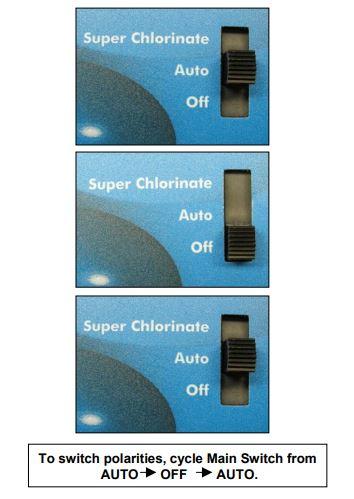
  2. Switch your cell type by cycling the main switch from AUTO to SUPER CHLORINATE and then back to AUTO.
  3. Push the diagnostic button until “T-XX” appears on the display.

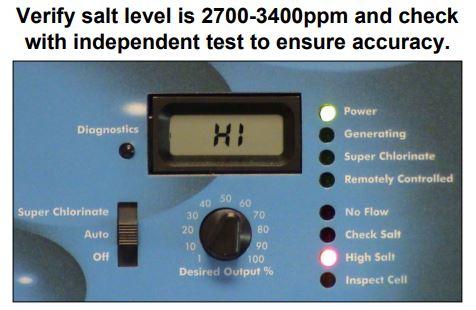
Step 2: Verify the accuracy of the salt readings (2700-3400 ppm) with an independent test kit or by taking a water sample to your local pool store for testing. 3200 ppm is the ideal level.

If the salt level is below range, add enough salt to achieve a salt level of 3200 ppm.

If the salt level is within range, go to Step 3.

How To Add Salt To Your Pool

Step 3: Is your cell clean? Inspect and clean your cell. If you haven’t inspected your cell yet, now is a perfect time. (Yes, literally now.)

Does your cell look like 4A or 4B?
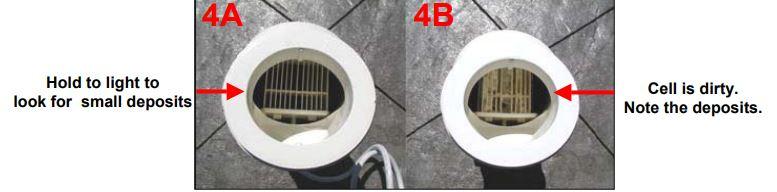
If your cell looks like 4A, continue to Step 4.

If your cell looks like 4B, follow the instructions below for cleaning your cell.

How To Clean An Aqua Rite Turbo Cell 

Step 4: Reset the average salt level.

Reset the average salt level on startup and whenever you replace your cell. (The factory default is 2800 ppm)

How To Recalibrate The Average Salt Level

  1. To reset your average salt level, turn the unit to OFF and then back to AUTO. Wait for the relay to click (5 to 10 seconds).
  2. After the click, immediately push the diagnostic button 5 times to begin the recalibration stage.
  3. Once it finishes calibrating, cycle the Main Switch from AUTO to SUPER CHLORINATE and back to AUTO.

Step 5: Measure your cell’s polarity to ensure they meet system parameters.

If the amps on either reading show zero (0), then you should replace your Main PC Board (GLX-PCB-RITE).

If the amps show a reading that isn’t within range, then you should replace your Turbo Cell.


click here to find your replacement Salt System Parts

High Salt LED ON

The High Salt LED stays on when:

  • The cell amperage is above the maximum limit.
  • You have too much salt in your pool.
  • The control is set for the wrong turbo cell type.

Possible Remedies

Step 1: Check your system to confirm that you have programmed the correct cell size. If you program an incorrect cell size, the salt level, amperage, and voltage will not be correct and the system will turn off. Also, make sure you plug in the cell all the way. You might be surprised by how many people neglect to check this area.

How To Set Your Turbo Cell Size

  1. Slide your main switch to the AUTO position.
  2. Switch your cell type by cycling the main switch from AUTO to SUPER CHLORINATE then back to AUTO.
  3. Push the diagnostic button until “T-XX” appears on the display.

Step 2: Verify the accuracy of the salt readings (2700-3400 pm) with an independent test kit or by taking a water sample to your local pool store for testing. 3200 ppm is the ideal level.

If the salt level is below range, add enough salt to achieve a salt level of 3200 ppm.

If the salt level is within range, go to Step 3.

How To Lower Your Salt Levels

Step 3: Is your cell clean? Inspect and clean your cell. If you haven’t inspected your cell yet, now is a perfect time. (Yes, literally now.)

Does your cell look like 4A or 4B?

If your cell looks like 4A, continue to Step 4.

If your cell looks like 4B, follow the instructions below for cleaning your cell.

How To Clean An Aqua Rite Turbo Cell 

Step 4: Reset the average salt level.

Reset the average salt level on startup and whenever you replace your cell. (The factory default is 2800 ppm)

How To Recalibrate The Average Salt Level

  1. To reset your average salt level, turn the unit to OFF and then back to AUTO. Wait for the relay to click (5 to 10 seconds).
  2. After the click, immediately push the diagnostic button 5 times to begin the recalibration stage.
  3. Once it finishes calibrating, cycle the main switch from AUTO to SUPER CHLORINATE and back to AUTO.

If recalibrating your salt level did not resolve your problem, then your cell or your PCBoard is bad and needs replacing. For more in depth troubleshooting or if you need help discerning which one to replace first, we recommend calling Hayward directly.

No Flow LED Flashing or ON

The No Flow LED flashes for up to 60 seconds during startup.

  • If the No Flow LED is flashing, wait 60 seconds after starting your pump and filter.
  • Check for possible turbulence or obstructions inside of the flow T.
  • Ensure there are at least 12 inches of straight pipe before the flow switch.
  • There should be NO elbow after the flow switch.

Possible Remedies

Step 1: Wait 60 seconds after the pump starts. Typically, the LED light should shut off after 60 seconds. If it does not, keep reading.

Step 2: Verify that you have enough straight pipe before where you have installed your flow switch. There should be at least 12″ of straight pipe before the switch.

Replumb your flow switch if it does not meet the distance requirements. Does the LED light turn off after 60 seconds? If not, keep reading.

Step 3: Ensure that there isn’t anything obstructing or blocking the flow. In most cases, if there is a blockage, your pump’s pressure increases. Remove blockage and backwash your filter.

Step 4: If none of the previous steps solved the problem, replace your flow switch.

The NO FLOW LED stays ON when there is a flow switch problem.

  • Verify if your flow switch was installed correctly.
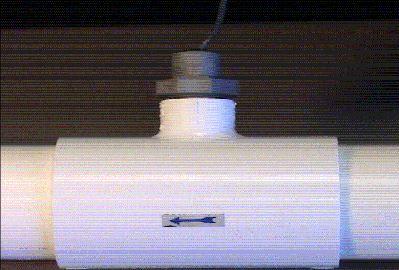
  • The arrow at the top of the hex nut points in the direction of the water flow.
  • Flow switches require a minimum flow fate of 11 gallons per minute to stay consistently closed
  • Check for damaged or cut wires

Possible Remedies

Step 1: With your pump running, double-check the positions of your valves.

Step 2: Did you properly install your switch? The arrow should point in the same direction as the water flow. If it is not, re-align your flow switch.

Step 3: Double check the wires on the flow switch for damage. If you see any damage, replace your flow switch. If there isn’t any apparent damage, keep reading.

Step 4: Verify your pump’s pressure. If you see an increase in pump pressure, ensure that there is no blockage preventing the flow.

Step 5: Replace your switch.

Low or High Cell Temperature
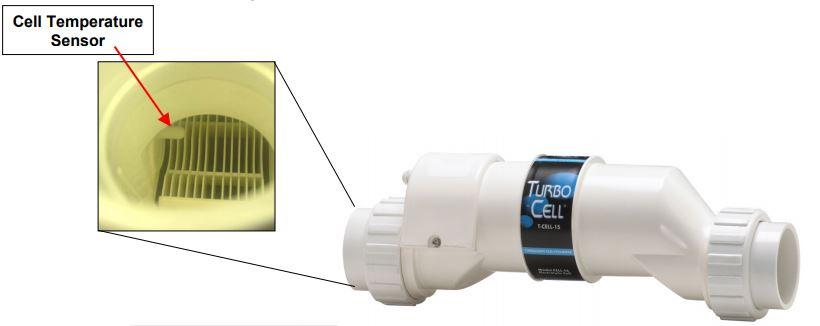
The LCD display reads COLD when:

  • Water temperature is below 50 degrees F. (The cell output scales back to 20% once it reaches 60 degrees F and shuts off at 50 degrees F.)

The LCD display reads HOT when:

  • Water temperature is above 140 degrees F.

* If your water temperature reads 215 degrees F, the cell temperature sensor is shorted and your cell needs replacing. *

Other Common Problems and Solutions

Power LED Not On

  • Make sure that either 120VAC or 240VAC input power is connected to the proper screw terminals at the Aqua Rite control.
  • Verify input voltage with a voltmeter
  • If there is input power, the fuse may have blown.
  • The Aqua Rite is protected by a 20 amp mini ATO fuse located on the circuit board above the cell connector.

‘Generating’ LED Flashing

  • The temperature of the pool water is too high or too low to operate.
  • Override this by moving the Main Switch to Super Chlorinate. The Aqua Rite runs at maximum out for for the remainder of the current pump cycle or for 24 hours, whichever comes first.

author avatar
Charlie Ramirez
Writer at InyoPools.com, brings a wealth of knowledge and expertise in pool care and equipment, helping pool owners make informed decisions for over a decade.

Related Videos

332 responses to “Troubleshooting Your Hayward Aqua Rite System”

  1.  Avatar

    Hi, our Hayward AquaTrol is about 7 years old and it’s suddenly having a problem. We’re getting the Generating LED briefly flashing and then turning off. No lights at all on the display and it’s definitely not generating chlorine. Pump is running and we do have flow. We’ve already checked the fuse and all is fine. Help!

    1. Matthew Simmons Avatar

      When was the last time you cleaned the cell? How do the plates looks, any scaling?

  2. Joe Avatar

    Just installed a new pool and running my chlorinator for the first time.. we balanced the chemicals and added salt. I have a t 3 cell and my numbers creeped from 2800 to 3700 I had the dial at 5 ppm and chloromator is still generating. Why has it not shut down ?

    Thank you,

    1. Matthew Simmons Avatar

      When you add the salt it takes time for it to dissolve completely into solution. This may be the reason for your slow creep up to 3700 ppm. The cell would keep generating until it hits the 5 ppm setting, it is probably still running because it has not reached that mark. Also, 5 ppm is high for a salt pool. I would set it to 2 or 3

      1. Joe Avatar

        Thank you for the quick response. When I said 5 ppm I was trying to say 5 %output on the dial. When satisfied would the unit stay on stand and not generate ? I have been running it for 8hours a day since Saturday and pool is still saying 3700. Having trouble understanding how to maintain the right range.

        Any help would be great.

        Thank you,

        1. Matthew Simmons Avatar

          The cell would stay on even while it is not generated, but the “Generating” light wouldn’t be lit. When you have it set to 5% production, that means in any given hour the cell would only be active for 3 minutes.

          If the salt reading is accurate, then it is not going to go down unless you drain a portion of the water. Get your water tested by a local pool company to confirm the salinity level. Proper salinity levels for an AquaRite is 2700 to 3400 ppm.

  3. Dennis Duncan Avatar

    My unit stop working, no led’s at all. I replaced the transformer, had main board repaired and replaced the indicator board. Still no lights at all, although I can hear the transformer’s quiet normal hum now. Even the plug that operates my pump doesn’t work. But the pump will come on when I use any other source of power. This is driving me crazya

  4. John Stucky Avatar

    I forgot to mention that I have already tried calibrating the salt cell. I hope what I said above makes sense. My phone was acting up. Thanks!

  5. John Stucky Avatar

    Mike, I have a strange one. My awful right was not producing chlorine like it should. The display board says I have 3500 salt but I have had it checked locally several times and it’s only about 2600. I have a strange one. My swim pure T-9 was not producing chlorine like it should. The display board says I have 3400 salt but I have had it checked locally several times and it’s only about 2400. The cell amperage seems to confirm this because it only shows 5.17 amps which is low for a T-9. I clean my cell monthly. Otherwise the system seems to be operating normal and all the other diagnostics are correct. Any ideas? Do you know if the high salt alarm is tied to the amperage for the cell? In other words can I keep adding salt until it is the actual correct salt level without causing the swim pure to stop working? As long as the amperage doesn’t go to high I should be ok? Thanks!

    1. Matthew Simmons Avatar

      Hello Jim, I would add enough salt to get the water into the 2700 to 3400 ppm range and see what happens. If it doesn’t work then you can drain and add fresh water pretty easily.

      But to be honest, I am a little confused because you mentioned two different units and two different salinity level problems. Also, that you said that the cell was not producing in the beginning, but then said you don’t want it to stop working by the end.

      1. John S. Avatar

        Mathew. My apologies for the phone issues! Here is what is going on:
        Swim pure plus system with a T-9 cell. It is not producing chlorine like it should. The Swim pure says that the water already has 3500 salt but when I had it tested locally it only had 2400. I now understand why cell isn’t producing because it doesn’t have enough salt but the swim pure is incorrectly showing a reading of 3500. I’ve already tried re calibrating the salt cell but it still is reading high. I am afraid that if I put enough salt to get the real salt reading up to 2700-3400 that the swim pure will shut down because it thinks the salt level is too high. I read somewhere that the salt reading on the display is calculated from the amp reading from the salt cell. On mine, the T9 is amp reading is low–only 5.17 and it should be 6.5. Very strange deal. You are probably right, the only thing I can do is keep adding salt until the physical salt is correct and see if the system continues to operate. Does that make more sense? Thanks!

  6. Tanya Avatar

    Hi I need some help. Got the Aqua Trol last year worked great. This year turned on and the Check Tcell and Check salt light solid and display was hard to read. Got hold of Hayward they sent new tcell and display I installed and ran system for 24 hours. Can see display but I am still getting check Tcell and Salt light solid. Getting so frustrated as my pool guy is not helping me at all and I would have to pay if I have different guy come out and take a look.

    1. Matthew Simmons Avatar

      Have you tested your water’s salinity level? If so, what is result? If your salt level is actually low, that could be a cause of the problem persisting.

  7. Chris Ammann Avatar

    My aqua rite unit will turn on the power, generating and superchlorinate LEDs (in that mode) then after maybe 30 seconds I hear relays click and all the LEDs turn off. If in normal mode it does the same with just the power and generate leds. My chlorine has dropped to almost 0 so I’m assuming that means it isn’t running. Display always reads 3400 and never turns off. Any ideas? Help would be greatly appreciated

    1. Chris Ammann Avatar

      Forgot to mention, it does this in a continuous loop, lights come on, clicks, go off. Display always reads 3400

      1. Matthew Simmons Avatar

        That is a laundry list of problems. It is probably the main board, but I would check with Hayward to be sure.

    2. Dana Donlon Avatar

      I am having the same problem did you ever find out what was wrong.

  8. Brendan Avatar

    My Aquarite T-9 has a no flow light on, so its not producing. Also, the volts reads 30.5, amps reads 0.00 The salt level is 3700, the instant is -0.00. I looked at the flow sensor, it looks ok to me. Any ideas on why its not producing? The system is only 2 years old.

    1. Matthew Simmons Avatar

      From the article above:

      If the amps on either reading show zero (0), then you should replace your PC Board.

      1. Ted Avatar

        My Aquarite shows check salt, check cell lights on, reading was 700. Cleaned the cell, it worked for a day. When the pump cycled back on the next day, the same symptoms check salt, check cell light on this time with no generating light on and reading 1600. Had the salt level checked by pool supply was 3200. Replaced the cell with the same type that was removed Hayward T15, 40,000 gal. After a day of what appeared to be normal operation, once the pump cycled off for the day and back on the next morning the same symptoms reappeared. The check salt, check cell lights on and generating light off. Went through all the troubleshooting diagnostics able to get the check salt, check cell lights off and the generator light on, seemed normal again. Had the salt level checked again at the pool supply still in the same range 3300. Decided to clean the pool and after backwashing the no flow light illuminated with inspect cell light on and generating light off, (first time the no flow light has ever been on during all this trouble, except for when the replacement cell was first installed and pump running during the initial start up) I understand that when the no flow light is on that the generator light will remain off. Played around with the control panel and all the lights started working as normal, only the power and generating lights were On. Once again after the pump cycles off and back on the next day the check salt, check cell lights on with the generating light off and the reading display shows 1600. Please advise.

        1. Matthew Simmons Avatar

          Maybe try this more in-depth AquaRite Troubleshooting Guide can help. But if that doesn’t work then you should contact the manufacturer. Their techs know the product better than anyone else out there. Hayward Tech Support line: 908-355-7995

        2. Keith Avatar

          Ted, did you get a solution. I have a new pool and am experiencing something similar or perhaps the same. t-3 cell. I recalibrate and all is well. When variable pump either shuts off or lessens flow it seems to screw everything up. readings go lower and I believe salt level to be fine based upon tests at pool company and strips.

      2.  Avatar

        So my amps are reading 0 so I need a new PC board. Does it matter that my display cycle doesn’t show my t-cell number at all? It goes from the r1.45 to the salt reading.

        1. Matthew Simmons Avatar

          If your board is bad then it probably is going to show some other odd values as well.

          The issue should be corrected by the new board.

          1. Bill S Avatar

            Could this possibly be an older Mineral Springs system? I have an original before Hayward bought them and I have no ability to set the T-cell type.

          2. Matthew Simmons Avatar

            If your salt system is 2010 or earlier (I think), the control panels can not be set to accept the various Turbo Cells. When the Mineral Springs, AquaRite, SwimPure plus, and whatever else they rebranded it as were first introduced, only the TCELL15 was available.

          3. Hal Avatar

            I think the “older than 2010 uses T15 is incorrect? I have an older system with r 1.45 firmware version. Is uses the GLX Cell 5 and seems to work fine. We just bought the house and the previous owner may have replaced with the wrong cell I guess but…seems to work ok.

          4. Matthew Simmons Avatar

            If you need to identify a specific pool model, check out our article titled Identify My Above Ground Pool. Or, email us at agparts@inyopools.com

  9. Albert Avatar

    I have a T-9 cell , I the check salt and inspect cell light comes on I brought the T-9 to pool store they said it’s working good also my salt levels at the pool store said good readings I reset because it shows low salt and it works fine for a bit then the lights come on again ?? why is it not working properly>?

    1. Jimmy Avatar

      I’m having the same issue. My pool started to get cloudy last night, and a little greenish. The Aquarite panel reads 1800. The pool company tested the water today, and they said my salt level was actually closer to 4000! Anyways, my check salt and inspect cell lights are both staying on, despite attempts to recalibrate the system. Any thoughts? Thanks!

      1. Matthew Simmons Avatar

        Have you tried cleaning the cell? How old is the cell?

        If it is older than 3 years, than it could be an issue with the cell. That means you would need a new cell.

        1. Jimmy Avatar

          Cleaned the cell properly and it’s back to working properly!

  10. Ganesh Avatar

    i replaced main circuit board (GLX-PCB-RITE) last year and this year i put a brand T-15cell. my generator lcd is always showing 0, i cannot run diagnostics, power led is ON, no flow led flashes initially once flow is detected it would turn off. i checked my board again but nothing seems wrong to naked eye. Inspect cell led wont come on even if i remove the cell from control panel.so im concerned whether the circuit board has gone bad again. any advise

    1. Matthew Simmons Avatar

      The only thing you haven’t replaced is the AquaRite Display Board. Before I go tell you to replace that too, you should probably call Hayward for some troubleshooting. They should be able to give you a confirmation what is wrong, pretty easily. Hopefully, it is a cheaper fix than a different board.

Leave a Reply

Your email address will not be published. Required fields are marked *