
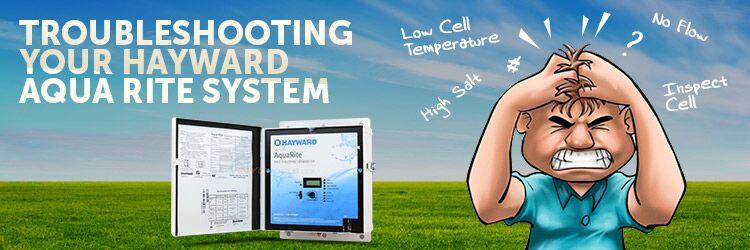
Salt chlorine generators are great products. But, you know what’s not great? Troubleshooting and diagnosing their problems. If you’re reading this blog that means you need help troubleshooting your Hayward Aqua Rite salt system. Well, the good news is you are at the right spot and you’re definitely not alone.
This blog is an in-depth look at the Aqua Rite and Aqua Rite XL diagnostics manual created by Hayward.
Check Salt & Inspect Cell LED FLASHING or ON

The Inspect Cell LED (only) flashes or stays on when:
- The 500 operation hour countdown timer expires. To fix the problem, manually reset the Inspect Cell LED.
How To Reset The Inspect Cell LED
- Press and hold the diagnostic button for 3 to 5 seconds. The LED light should go out.
The Check Salt & Inspect Cell LED’s flash together when:
- Your salt level is between 2500-2600 parts per million (ppm). Your chlorine generator is still producing chlorine at the moment, which is a good thing. This is more of an indicator light than anything else.
The Check Salt & Inspect Cell LED’s will stay ON when:
- The salt level is 2300 ppm or less and no chlorine is generating.
Possible Remedies
Step 1: Check your system to confirm that you have programmed the correct salt cell size. If you program the incorrect cell size, the salt level, amperage, and voltage will not be correct and the system will turn off. Also, make sure you plug in the cell all the way. You might be surprised by how many people neglect to check this area.
How To Set Your Turbo Cell Size
- Slide your main switch to the AUTO position.
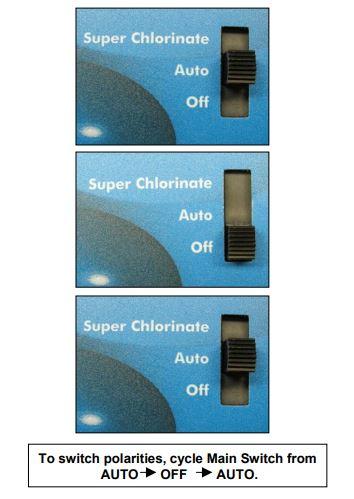
- Switch your cell type by cycling the main switch from AUTO to SUPER CHLORINATE and then back to AUTO.
- Push the diagnostic button until “T-XX” appears on the display.
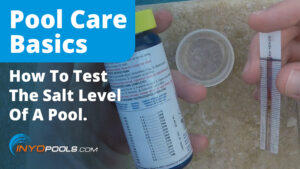
Step 2: Verify the accuracy of the salt readings (2700-3400 ppm) with an independent test kit or by taking a water sample to your local pool store for testing. 3200 ppm is the ideal level.
If the salt level is below range, add enough salt to achieve a salt level of 3200 ppm.
If the salt level is within range, go to Step 3.
How To Add Salt To Your Pool
Step 3: Is your cell clean? Inspect and clean your cell. If you haven’t inspected your cell yet, now is a perfect time. (Yes, literally now.)
Does your cell look like 4A or 4B?
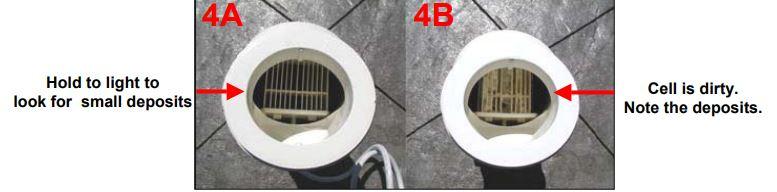
If your cell looks like 4A, continue to Step 4.
If your cell looks like 4B, follow the instructions below for cleaning your cell.
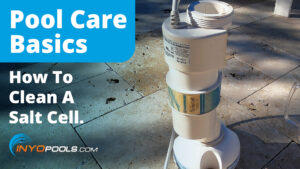
How To Clean An Aqua Rite Turbo Cell
Step 4: Reset the average salt level.
Reset the average salt level on startup and whenever you replace your cell. (The factory default is 2800 ppm)
How To Recalibrate The Average Salt Level
- To reset your average salt level, turn the unit to OFF and then back to AUTO. Wait for the relay to click (5 to 10 seconds).
- After the click, immediately push the diagnostic button 5 times to begin the recalibration stage.
- Once it finishes calibrating, cycle the Main Switch from AUTO to SUPER CHLORINATE and back to AUTO.
Step 5: Measure your cell’s polarity to ensure they meet system parameters.
If the amps on either reading show zero (0), then you should replace your Main PC Board (GLX-PCB-RITE).
If the amps show a reading that isn’t within range, then you should replace your Turbo Cell.


High Salt LED ON
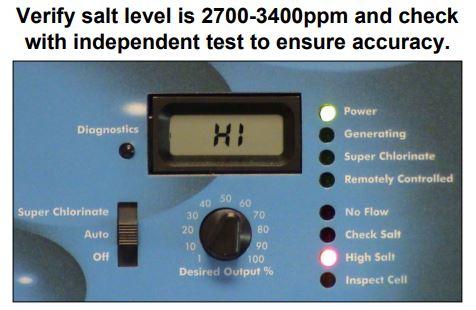
The High Salt LED stays on when:
- The cell amperage is above the maximum limit.
- You have too much salt in your pool.
- The control is set for the wrong turbo cell type.
Possible Remedies
Step 1: Check your system to confirm that you have programmed the correct cell size. If you program an incorrect cell size, the salt level, amperage, and voltage will not be correct and the system will turn off. Also, make sure you plug in the cell all the way. You might be surprised by how many people neglect to check this area.
How To Set Your Turbo Cell Size
- Slide your main switch to the AUTO position.
- Switch your cell type by cycling the main switch from AUTO to SUPER CHLORINATE then back to AUTO.
- Push the diagnostic button until “T-XX” appears on the display.
Step 2: Verify the accuracy of the salt readings (2700-3400 pm) with an independent test kit or by taking a water sample to your local pool store for testing. 3200 ppm is the ideal level.
If the salt level is below range, add enough salt to achieve a salt level of 3200 ppm.
If the salt level is within range, go to Step 3.
How To Lower Your Salt Levels
Step 3: Is your cell clean? Inspect and clean your cell. If you haven’t inspected your cell yet, now is a perfect time. (Yes, literally now.)
Does your cell look like 4A or 4B?
If your cell looks like 4A, continue to Step 4.
If your cell looks like 4B, follow the instructions below for cleaning your cell.
How To Clean An Aqua Rite Turbo Cell
Step 4: Reset the average salt level.
Reset the average salt level on startup and whenever you replace your cell. (The factory default is 2800 ppm)
How To Recalibrate The Average Salt Level
- To reset your average salt level, turn the unit to OFF and then back to AUTO. Wait for the relay to click (5 to 10 seconds).
- After the click, immediately push the diagnostic button 5 times to begin the recalibration stage.
- Once it finishes calibrating, cycle the main switch from AUTO to SUPER CHLORINATE and back to AUTO.
If recalibrating your salt level did not resolve your problem, then your cell or your PCBoard is bad and needs replacing. For more in depth troubleshooting or if you need help discerning which one to replace first, we recommend calling Hayward directly.
No Flow LED Flashing or ON

The No Flow LED flashes for up to 60 seconds during startup.
- If the No Flow LED is flashing, wait 60 seconds after starting your pump and filter.
- Check for possible turbulence or obstructions inside of the flow T.
- Ensure there are at least 12 inches of straight pipe before the flow switch.
- There should be NO elbow after the flow switch.
Possible Remedies
Step 1: Wait 60 seconds after the pump starts. Typically, the LED light should shut off after 60 seconds. If it does not, keep reading.
Step 2: Verify that you have enough straight pipe before where you have installed your flow switch. There should be at least 12″ of straight pipe before the switch.
Replumb your flow switch if it does not meet the distance requirements. Does the LED light turn off after 60 seconds? If not, keep reading.
Step 3: Ensure that there isn’t anything obstructing or blocking the flow. In most cases, if there is a blockage, your pump’s pressure increases. Remove blockage and backwash your filter.
Step 4: If none of the previous steps solved the problem, replace your flow switch.
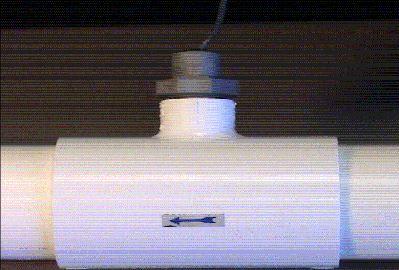
The NO FLOW LED stays ON when there is a flow switch problem.
- Verify if your flow switch was installed correctly.
- The arrow at the top of the hex nut points in the direction of the water flow.
- Flow switches require a minimum flow fate of 11 gallons per minute to stay consistently closed
- Check for damaged or cut wires
Possible Remedies
Step 1: With your pump running, double-check the positions of your valves.
Step 2: Did you properly install your switch? The arrow should point in the same direction as the water flow. If it is not, re-align your flow switch.
Step 3: Double check the wires on the flow switch for damage. If you see any damage, replace your flow switch. If there isn’t any apparent damage, keep reading.
Step 4: Verify your pump’s pressure. If you see an increase in pump pressure, ensure that there is no blockage preventing the flow.
Step 5: Replace your switch.
Low or High Cell Temperature
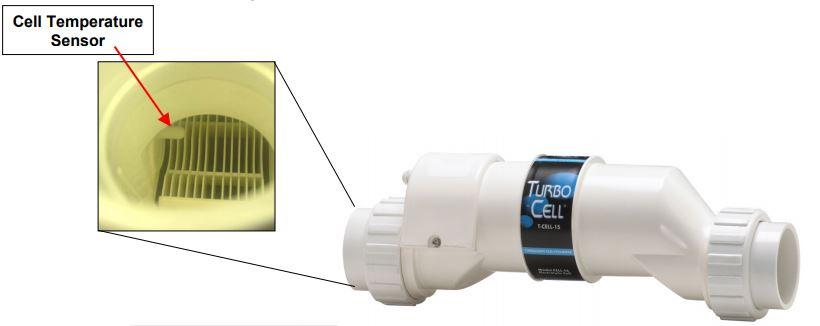
The LCD display reads COLD when:
- Water temperature is below 50 degrees F. (The cell output scales back to 20% once it reaches 60 degrees F and shuts off at 50 degrees F.)
The LCD display reads HOT when:
- Water temperature is above 140 degrees F.
* If your water temperature reads 215 degrees F, the cell temperature sensor is shorted and your cell needs replacing. *
Other Common Problems and Solutions
Power LED Not On
- Make sure that either 120VAC or 240VAC input power is connected to the proper screw terminals at the Aqua Rite control.
- Verify input voltage with a voltmeter
- If there is input power, the fuse may have blown.
- The Aqua Rite is protected by a 20 amp mini ATO fuse located on the circuit board above the cell connector.
‘Generating’ LED Flashing
- The temperature of the pool water is too high or too low to operate.
- Override this by moving the Main Switch to Super Chlorinate. The Aqua Rite runs at maximum out for for the remainder of the current pump cycle or for 24 hours, whichever comes first.






Leave a Reply