Home / Articles / Troubleshooting Your Hayward Aqua Rite System

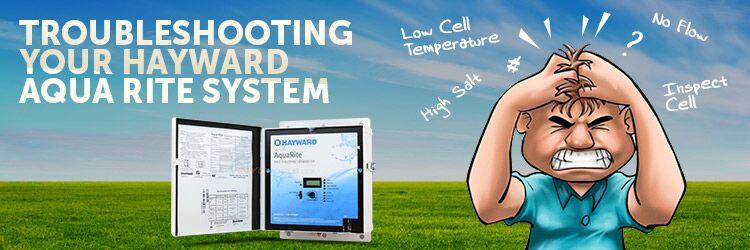
Troubleshooting Your Hayward Aqua Rite System

Salt chlorine generators are great products. But, you know what’s not great? Troubleshooting and diagnosing their problems. If you’re reading this blog that means you need help troubleshooting your Hayward Aqua Rite salt system. Well, the good news is you are at the right spot and you’re definitely not alone.

This blog is an in-depth look at the Aqua Rite and Aqua Rite XL diagnostics manual created by Hayward.

Check Salt & Inspect Cell LED FLASHING or ON

The Inspect Cell LED (only) flashes or stays on when:

  • The 500 operation hour countdown timer expires. To fix the problem, manually reset the Inspect Cell LED.

How To Reset The Inspect Cell LED

  1. Press and hold the diagnostic button for 3 to 5 seconds. The LED light should go out.

The Check Salt & Inspect Cell LED’s flash together when:

  • Your salt level is between 2500-2600 parts per million (ppm). Your chlorine generator is still producing chlorine at the moment, which is a good thing. This is more of an indicator light than anything else.

The Check Salt & Inspect Cell LED’s will stay ON when:

  • The salt level is 2300 ppm or less and no chlorine is generating.

Possible Remedies

Step 1: Check your system to confirm that you have programmed the correct salt cell size. If you program the incorrect cell size, the salt level, amperage, and voltage will not be correct and the system will turn off. Also, make sure you plug in the cell all the way. You might be surprised by how many people neglect to check this area.

How To Set Your Turbo Cell Size

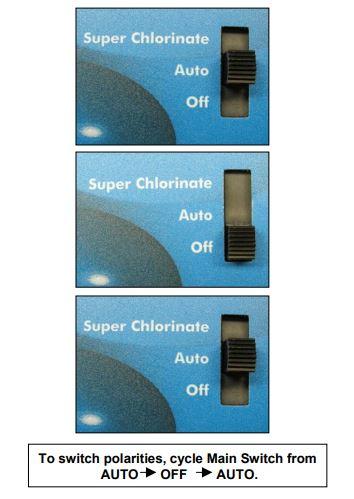
  1. Slide your main switch to the AUTO position.
  2. Switch your cell type by cycling the main switch from AUTO to SUPER CHLORINATE and then back to AUTO.
  3. Push the diagnostic button until “T-XX” appears on the display.

Step 2: Verify the accuracy of the salt readings (2700-3400 ppm) with an independent test kit or by taking a water sample to your local pool store for testing. 3200 ppm is the ideal level.

If the salt level is below range, add enough salt to achieve a salt level of 3200 ppm.

If the salt level is within range, go to Step 3.

How To Add Salt To Your Pool

Step 3: Is your cell clean? Inspect and clean your cell. If you haven’t inspected your cell yet, now is a perfect time. (Yes, literally now.)

Does your cell look like 4A or 4B?
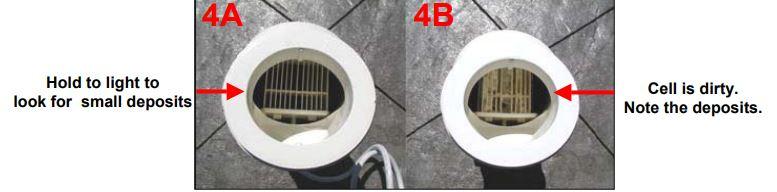
If your cell looks like 4A, continue to Step 4.

If your cell looks like 4B, follow the instructions below for cleaning your cell.

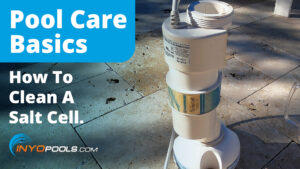
How To Clean An Aqua Rite Turbo Cell 

Step 4: Reset the average salt level.

Reset the average salt level on startup and whenever you replace your cell. (The factory default is 2800 ppm)

How To Recalibrate The Average Salt Level

  1. To reset your average salt level, turn the unit to OFF and then back to AUTO. Wait for the relay to click (5 to 10 seconds).
  2. After the click, immediately push the diagnostic button 5 times to begin the recalibration stage.
  3. Once it finishes calibrating, cycle the Main Switch from AUTO to SUPER CHLORINATE and back to AUTO.

Step 5: Measure your cell’s polarity to ensure they meet system parameters.

If the amps on either reading show zero (0), then you should replace your Main PC Board (GLX-PCB-RITE).

If the amps show a reading that isn’t within range, then you should replace your Turbo Cell.


click here to find your replacement Salt System Parts

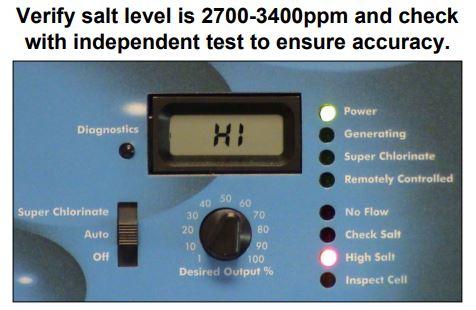
High Salt LED ON

The High Salt LED stays on when:

  • The cell amperage is above the maximum limit.
  • You have too much salt in your pool.
  • The control is set for the wrong turbo cell type.

Possible Remedies

Step 1: Check your system to confirm that you have programmed the correct cell size. If you program an incorrect cell size, the salt level, amperage, and voltage will not be correct and the system will turn off. Also, make sure you plug in the cell all the way. You might be surprised by how many people neglect to check this area.

How To Set Your Turbo Cell Size

  1. Slide your main switch to the AUTO position.
  2. Switch your cell type by cycling the main switch from AUTO to SUPER CHLORINATE then back to AUTO.
  3. Push the diagnostic button until “T-XX” appears on the display.

Step 2: Verify the accuracy of the salt readings (2700-3400 pm) with an independent test kit or by taking a water sample to your local pool store for testing. 3200 ppm is the ideal level.

If the salt level is below range, add enough salt to achieve a salt level of 3200 ppm.

If the salt level is within range, go to Step 3.

How To Lower Your Salt Levels

Step 3: Is your cell clean? Inspect and clean your cell. If you haven’t inspected your cell yet, now is a perfect time. (Yes, literally now.)

Does your cell look like 4A or 4B?

If your cell looks like 4A, continue to Step 4.

If your cell looks like 4B, follow the instructions below for cleaning your cell.

How To Clean An Aqua Rite Turbo Cell 

Step 4: Reset the average salt level.

Reset the average salt level on startup and whenever you replace your cell. (The factory default is 2800 ppm)

How To Recalibrate The Average Salt Level

  1. To reset your average salt level, turn the unit to OFF and then back to AUTO. Wait for the relay to click (5 to 10 seconds).
  2. After the click, immediately push the diagnostic button 5 times to begin the recalibration stage.
  3. Once it finishes calibrating, cycle the main switch from AUTO to SUPER CHLORINATE and back to AUTO.

If recalibrating your salt level did not resolve your problem, then your cell or your PCBoard is bad and needs replacing. For more in depth troubleshooting or if you need help discerning which one to replace first, we recommend calling Hayward directly.

No Flow LED Flashing or ON

The No Flow LED flashes for up to 60 seconds during startup.

  • If the No Flow LED is flashing, wait 60 seconds after starting your pump and filter.
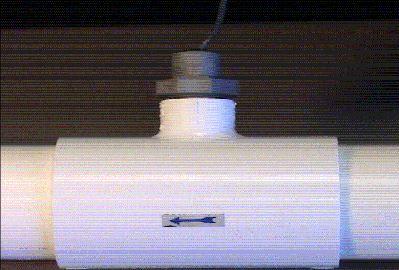
  • Check for possible turbulence or obstructions inside of the flow T.
  • Ensure there are at least 12 inches of straight pipe before the flow switch.
  • There should be NO elbow after the flow switch.

Possible Remedies

Step 1: Wait 60 seconds after the pump starts. Typically, the LED light should shut off after 60 seconds. If it does not, keep reading.

Step 2: Verify that you have enough straight pipe before where you have installed your flow switch. There should be at least 12″ of straight pipe before the switch.

Replumb your flow switch if it does not meet the distance requirements. Does the LED light turn off after 60 seconds? If not, keep reading.

Step 3: Ensure that there isn’t anything obstructing or blocking the flow. In most cases, if there is a blockage, your pump’s pressure increases. Remove blockage and backwash your filter.

Step 4: If none of the previous steps solved the problem, replace your flow switch.

The NO FLOW LED stays ON when there is a flow switch problem.

  • Verify if your flow switch was installed correctly.
  • The arrow at the top of the hex nut points in the direction of the water flow.
  • Flow switches require a minimum flow fate of 11 gallons per minute to stay consistently closed
  • Check for damaged or cut wires

Possible Remedies

Step 1: With your pump running, double-check the positions of your valves.

Step 2: Did you properly install your switch? The arrow should point in the same direction as the water flow. If it is not, re-align your flow switch.

Step 3: Double check the wires on the flow switch for damage. If you see any damage, replace your flow switch. If there isn’t any apparent damage, keep reading.

Step 4: Verify your pump’s pressure. If you see an increase in pump pressure, ensure that there is no blockage preventing the flow.

Step 5: Replace your switch.

Low or High Cell Temperature
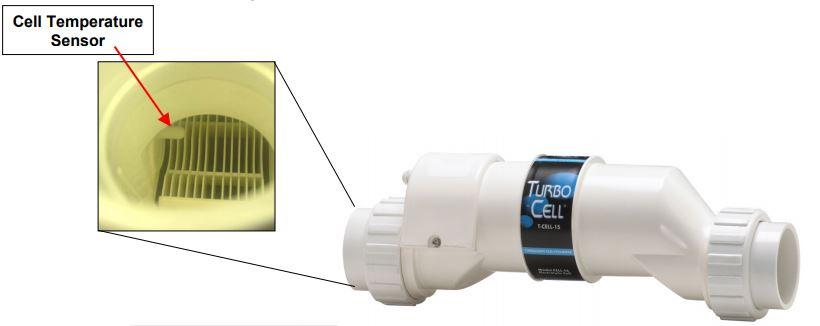
The LCD display reads COLD when:

  • Water temperature is below 50 degrees F. (The cell output scales back to 20% once it reaches 60 degrees F and shuts off at 50 degrees F.)

The LCD display reads HOT when:

  • Water temperature is above 140 degrees F.

* If your water temperature reads 215 degrees F, the cell temperature sensor is shorted and your cell needs replacing. *

Other Common Problems and Solutions

Power LED Not On

  • Make sure that either 120VAC or 240VAC input power is connected to the proper screw terminals at the Aqua Rite control.
  • Verify input voltage with a voltmeter
  • If there is input power, the fuse may have blown.
  • The Aqua Rite is protected by a 20 amp mini ATO fuse located on the circuit board above the cell connector.

‘Generating’ LED Flashing

  • The temperature of the pool water is too high or too low to operate.
  • Override this by moving the Main Switch to Super Chlorinate. The Aqua Rite runs at maximum out for for the remainder of the current pump cycle or for 24 hours, whichever comes first.

author avatar
Charlie Ramirez
Writer at InyoPools.com, brings a wealth of knowledge and expertise in pool care and equipment, helping pool owners make informed decisions for over a decade.

Related Videos

332 responses to “Troubleshooting Your Hayward Aqua Rite System”

  1. MATT LANTIERE Avatar

    Matt: I had some issues with this Aquarite system .. lead me to replacing both the display and the main board — now each morning it reads “700” on the display, as well as “CHECK SALT” and “INSPECT CELL” blinks … go through the calibration routine and everything seems to go back to normal — until the next morning. (kind of like GROUNDHOG DAY) — what’s you thought?

    1. Matthew Simmons Avatar

      Matt, It’s possible that the wrong cell size is selected in the diagnostics. It could also be the cell needs to be cleaned or replaced.

      which TCELL are you using, and have you made sure the control is set for it? How to Read and Adjust the Hayward Aqua Rite SCG Operational Values

  2. Brian Avatar

    I have an aqua rite system with only the green power light lit no matter where the switch is at. No other lights come on when I move switch from each position. Thanks!

    1. Matthew Simmons Avatar

      Does anything show up on the display? Can you see the diagnostics menu?

  3. Virgil Avatar

    These are my readings:
    Salt level 3200
    Temperature 85
    Voltage (22 – 32VDC) 16.8
    Amperage 0
    Desired output 100
    Instant salt 0
    Program code AL-0
    Circuit board revision 1.58
    Cell size t-15

    Problem description: Amperage = 0, no chlorine generation.

    Observed behavior:
    1 Turn on power. “No Flow” LED starts flashing.
    2 60sec later, “No Flow” LED tuns off. “Generating” LED turns on (green).
    3 10sec later all LEDs turn off.
    4 10sec later “Power” and “Generating” LEDs turn on (green)
    5 10sec later a click is heard
    6 8sec later “Power” and “Generating” LEDs turn off
    7 60sec later go to step 4

    Can you please help? Thank you so much in advance.

    1. Matthew Simmons Avatar

      From the article section regarding cell amperage:

      If the amps on either reading show zero (0), then you should replace your PC Board.

  4. Landon Avatar

    I opened my pool up this past week. Now I cannot get any power to the salt system. Pump and everything else is working? Went to the pool place and they are telling me that I need a whole new system. Do I need to try and get a brand new 20 amp min fuse? How about cleaning the cell do you think that my be the issue?

    1. Matthew Simmons Avatar

      You can buy a fuse for a couple of bucks and try it out; it is a pretty cheap and simple item to procure and install. If it isn’t the fuse and you have confirmed power is reaching the control box, the main PCB is likely bad and needs to be replaced.

      A dirty salt cell will not affect power getting to the unit

  5. Tom Crabtree Avatar

    Hiya Matt!
    I have a Hayward Goldline Salt Generator with a T-15 cell.
    Starting up the system this year, i get a constant flashing “Inspect Cell” light.
    When I press the Display button to reset the 500 hour operation limit, it does not reset the light., i.e., the flashing light stays on. The system is generating chlorine, but the stupid light stays flashing.
    If I push the Display button to see the settings, nothing happens. I can’t see any of the diagnostic values.
    I’m having the cell checked, but I suspect a problem on the PCB, unless I’m missing something.
    If I hold down the Display button for 10-10 seconds I do hear the relay reset, so I know the button and the board are working and the system is generating Chlorine.
    Help!!

    1. Matthew Simmons Avatar

      I see you have done all of this diagnostic work, but have you tried cleaning the cell? If the cell is still making chlorine, but you are still experiencing false alarms after the cleaning, you probably need to replace the Main PC Board.

  6. Jeff B in FL Avatar

    Hi Matt, I’ve read a years worth of owner comments and your responses. What I have determined is that it is nearly impossible to manage all the variables (cell function, PCB function, salt levels) and come up with a correct diagnosis of a problem from where you are sitting. The diagnostic flow charts are helpful but far from perfect.

    The one repeated complaint I see in this blog and elsewhere on the web and without a solution being provided is the complaint of a declining instant salt reading over time when tested pool salt levels are in range . That then results in (1) the salt cell shuts down at some point during a filtration cycle due to a low salt reading or (2) on restart of the pump/filtration cycle, the salt cell fails to restart because the last instant salt reading was out of the specified range for operation.

    Bottom line and still an unanswered question: why does the instant salt level reading decline during a filtration cycle when (1) the pool salt level is in range, (2) the salt cell is clean, working correctly and not aged out, (3) diagnostics indicate there are no problems with the PCB itself (hardware).

    Noteworthy in this discussion is that, with my system experiencing this problem of declining salt levels during a filtration cycle, by sliding the power switch to off then back to auto or super chlorinate, the system seeks a new instant salt level that is close to what your pool water test says it was. Then, the salt cell starts generating again and the cycle repeats itself, i.e., the instant salt level gradually declines forcing a halt to salt generation due to a low salt level that is presumably incorrectly determined by the system.

    The one thing I’ve not seen discussed anywhere is the potential for the PCBs to be improperly programmed at the factory level, i.e., the sampling sequence produces errors and in this case low salt readings. All other system components found to be within specifications (cell, pool chemistry, PCB) would lead one to believe a global software issue with certain PCBs coming out of certain facilities may be the underlying problem. I say “certain” PCBs because not every PCB demonstrates this behavior. It’s a quality control issue perhaps.

    One other thought: The way the system determines instant salt and by extension the memorized or average salt level is through a pre-programmed sampling sequence. Whenever you change the cell or correct pool salt levels by adding salt or diluting the pool a small change in salt concentration (PPMs) disrupts the accuracy of the programmed sampling cycle. It appears that it takes a while for the system to find a stable instant salt reading. A solution to the declining salt level problem that then shuts down the salt cell may be to leave your pool pump on for maybe 72 hours to allow multiple sampling cycles to occur without interruption. The one problem with this solution is that (1) if the PCB is programmed to shut off salt generation when the memorized or average salt level drops below spec or (2) It uses the instant salt reading to determine shut down parameters and this resets at every new filtration cycle, my proposed solution won’t help and we’re back to PCB programming issues that need to be addressed. Interested in hearing your take on this post.

    1. fred Avatar

      Any response to this comment? I’ve read most of this thread.

      I am getting a low salt reading. Multiple tests at pool store tell me I’m at 3500. Cell is a T15 and cell test at pool store is good.

      I can get an instant salt reading high enough to get the generator to work but it will shut down and tell me low salt.

      I’ve replaced the circuit board, to no avail.

      I’m ready to throw the whole system out. What else can I do?

      1. Chris Avatar

        same here, did you find a way to fix the problem I’m having same issue reading says 1600 so low salt light blinks and check cell light blinks. took the strips and my salt is at 4000 now because i kept adding salt.

  7. frank Avatar

    no flow light is on pump is running ok

    1. Matthew Simmons Avatar

      And have you done any of the troubleshooting mentioned in the guide?

  8. Misha Petrovic Avatar

    Hi, and thanks for such a nice guide… Although it has not solved my problem, it gave me a few ideas of what to look for. I’ll post the problem here, just in case there are some quick suggestions about what might be wrong with my system.
    Here are the symptoms:
    (1) Only the Power LED is on, Generating does not come on; Superchlorinating does not come on even when switched on, and no other LEDs ever come on, no error messages
    (2) the Output switch is set to 100%
    (3) The cell has been tested at a shop, it works fine,
    (4) The pool chemistry is good, salt is at 2900ppm (tested at Leslie’s), temp at 62F… After I did all water chemistry steps, and finally added 400 lbs of salt, I’ve been running the pump for about 14 hrs straight
    (5) Diagnostics works, it always shows zero for average and instant salinity, c. 33V for Cell Voltage, zero amps; cell type is t-15, correct.
    I did the circuit board troubleshooting as per Hayward guide, all voltages seem ok and correct, the fuse has continuity…
    I never hear any clicks for the relay switch when I turn the unit on, as mentioned somewhere in the guide, but then again the pump is loud, and I don’t really know how loud should that click be…

    any suggestions?

  9. Stephen Young Avatar

    My Hayward Aquarite unit (T-15) is producing no chlorine – I just took the salt cell to a testing place and they said it was working ‘like new’. All indicators are working as normal and all metrics within acceptable range. Couple of things are unusual (1) the control unit is producing a lot of heat – the box is almost too hot to touch (2) the salt reading is 3700 and tested 4100.
    Any advice? Thanks

    1. Matthew Simmons Avatar

      Just going through the things we mention in the article. You could try recalibrating the salt level, cleaning the cell, or try some of the other things mentioned at the bottom of the article, depending on the light alerts your box is providing.

  10. paul Avatar

    My system comes on and shows a HIGH reading, not generating. If I move the switch to off then back on it displays a salt reading (2700) and the generating light is on. Pool is starting to turn green. Any ideas as to what is causing this problem?

    1. Matthew Simmons Avatar

      First, get your water tested to figure out what your actual water salinity level. Adjust salt level as needed. Second, clean the cell. The cell may be malfunctioning because the sensors and plates are caked with scale. Third, if the first two things don’t work, use the diagnostics mentioned throughout this article.

Leave a Reply

Your email address will not be published. Required fields are marked *